
2026-04-29T16:20:00Z
Please note: List View is available on Business and Business Plus plans. But you can try it out on the 14-days free trial.
What is List View in Stackby?
List View in Stackby presents records in a vertical, structured layout, making it easier to navigate, filter, and update data. Unlike Grid View, which resembles a spreadsheet, List View is designed for users who prefer a categorized, easy-to-read format that provides clarity and focus.
It helps in focusing on key details by making scanning, filtering, and updating data much simpler.
Guide to List View
- Click on the View menu at the top of your table.
- Select List View from the available options. List view will be added to your table.
- You can customize rows for the list view. a. Prefix field: Select column from dropdown, which you want to add as prefix. b. Visible fields: Turn on toggle to see those fields in list view.
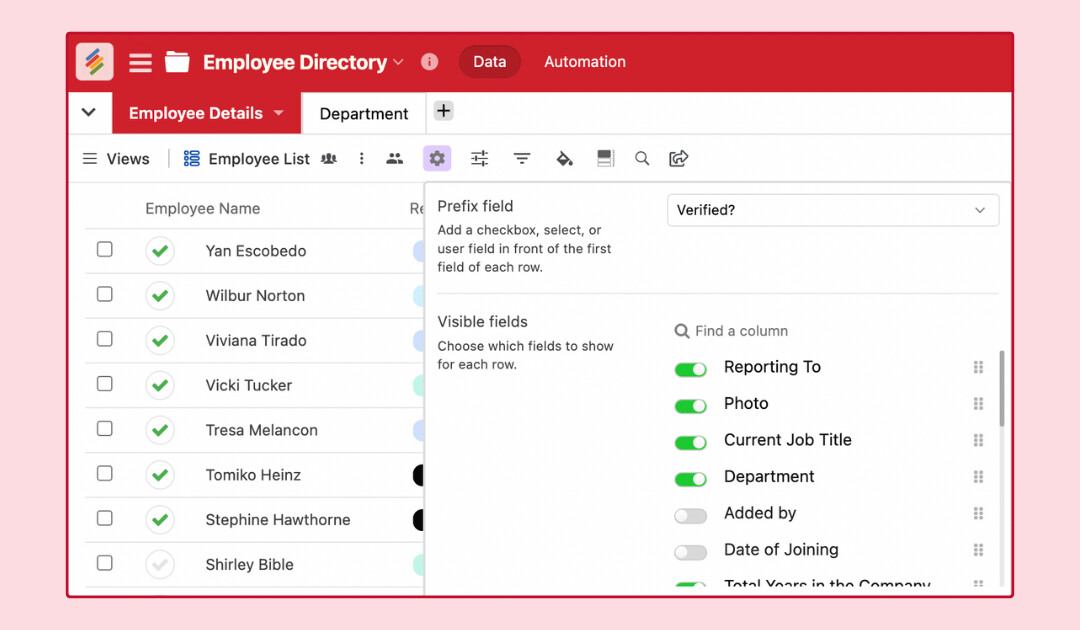
- Grouping for Better Organization (Coming Soon) Soon, you’ll be able to group records based on categories, teams, or priorities to make navigating large datasets even easier.
- You can right click on any record to bring up a menu of additional options allowing you to duplicate row, expand row, Add comment, copy the record URL, or delete row.

- Users with owner, creator, or editor permissions can click on a field to make edits. They also have the option to Open(expand records) for editing.
- From Customized row option, user can move column position.